Save Recipes from Social Media with Flavorish: TikTok, Instagram, Facebook, and YouTube
November 13, 2024

Social media is overflowing with recipe inspiration.
You find a pasta recipe on TikTok. A quick dinner idea on Instagram. A baking tutorial on YouTube. A family-style meal in a Facebook post. You save it, like it, screenshot it, or send it to yourself.
Then, when you’re ready to cook, you can’t find it.
That’s exactly why we built Flavorish’s Save Recipes from Social Media feature: to help you turn scattered food inspiration into an organized recipe collection you can actually use.
With Flavorish, you can save recipes from social media platforms like:
- TikTok
- YouTube
- Recipe links shared in messages
- Food blogs and recipe websites
Instead of hunting through saved posts, browser bookmarks, screenshots, and old text threads, you can keep everything in one place.
Flavorish turns saved recipes into meals.

Why We Built This Feature
Most people don’t discover recipes in cookbooks anymore. They discover them while scrolling. A creator posts a weeknight dinner on TikTok. A friend shares a Reel. A chef uploads a YouTube tutorial. A food blogger posts a recipe on Facebook. Suddenly, your next dinner idea could come from anywhere. But saving those recipes is messy. You might have recipes scattered across:
- Instagram saved posts
- TikTok favorites
- YouTube watch history
- Facebook groups
- Pinterest boards
- Browser bookmarks
- Screenshots
- Notes apps
- Text messages
The problem is not finding recipes. The problem is finding them again when you’re hungry, grocery shopping, or trying to plan dinner.
We built this feature because Flavorish should feel like a calm, organized home for every recipe you want to try. Not another folder of forgotten inspiration. Not another pile of screenshots.
One place for the recipes you actually want to cook.
What You Can Do with Flavorish
Flavorish is more than an app for saving recipes from social media. It is designed to help you organize, understand, and use the recipes you collect.
With Flavorish, you can:
- Save recipes from TikTok, Instagram, YouTube, Facebook, and more
- Keep social media recipes in one organized cookbook
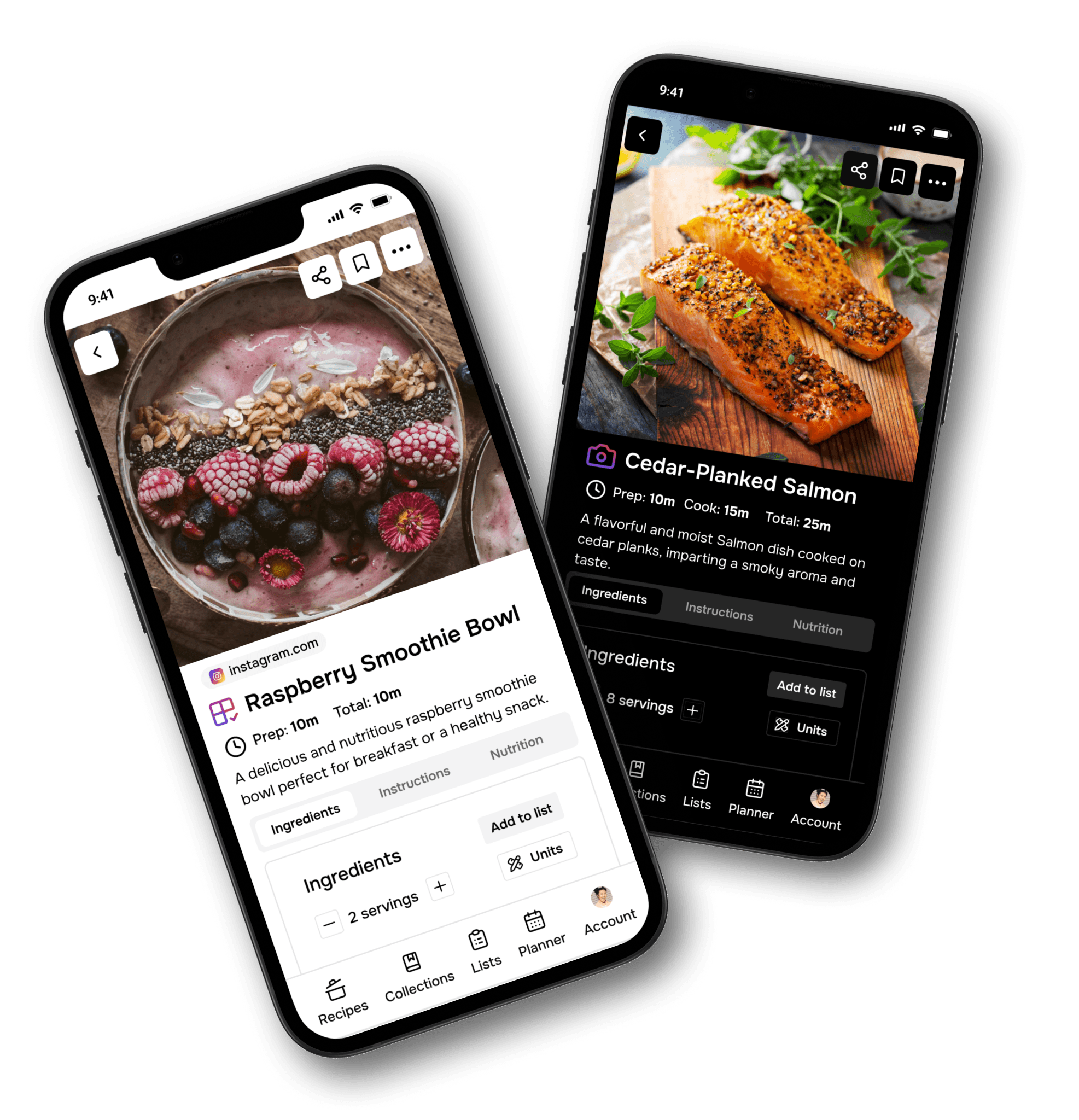
- Turn recipe links and posts into cleaner recipe cards
- Use AI to help extract or generate recipe details
- Search your saved recipes later
- Organize recipes by theme, occasion, diet, or ingredient
- Build your own personal digital cookbook
- Plan meals from recipes you already saved
- Reduce clutter from screenshots, bookmarks, and open tabs
If you’ve ever searched for the best app to save recipes from Instagram, an app to save TikTok recipes, or a recipe organizer for social media recipes, Flavorish was built for you.
How Saving Recipes from Social Media Works
Saving a recipe to Flavorish is simple. When you find a recipe you want to keep, use your phone’s share button and send it directly to Flavorish.
- Install Flavorish on your device if you haven’t already.
- Browse your favorite social media apps like TikTok, Instagram, or YouTube. When you see a recipe you like, simply tap "Share" and select Flavorish as your sharing option.
- Flavorish instantly grabs the recipe, so you don’t have to copy, paste, or transcribe any details manually. Just one tap, and it’s saved!
- Find it easily later by organizing your saved recipes into collections like “Weeknight Dinners,” “Healthy Meals,” or “Special Occasions.” This is one of the easiest ways to organize recipes from social media.
That’s it.
No copying ingredients into Notes.
No screenshotting captions.
No digging through liked videos.
No trying to remember which app had the recipe.
Which Social Media Platforms Does Flavorish Support?
Flavorish helps you save recipes from popular social and video platforms, including:
- Instagram: Public recipe posts and Reels
- TikTok: Recipe videos and posts
- YouTube: Cooking videos and tutorials
- Facebook: Public recipe posts, pages, photos, and videos
Flavorish works best when the post or video caption includes a full written recipe, including ingredients and instructions or the creator walks through it in the audio.
If the original post does not include complete recipe details, Flavorish may use AI to create a suggested recipe based on the available information, such as the title, caption, hashtags, description, and context. You can always review and edit the recipe after saving.
Why Flavorish Is Better Than Screenshots, Bookmarks, and Saved Posts
Saving a recipe inside a social app is easy. Using that recipe later is the hard part. Flavorish helps close the gap between inspiration and cooking.
- Everything is in one place: Instead of checking TikTok, Instagram, YouTube, Facebook, Pinterest, Safari, Chrome, and your camera roll, you can open Flavorish and search your recipe collection. That makes Flavorish your personal recipe hub for all the food ideas you want to revisit.
- Recipes are easier to find later: Social platforms are built for scrolling, not cooking. Flavorish is built for your kitchen. You can organize recipes by: Weeknight dinners, Healthy meals, High-protein recipes, Desserts, Brunch ideas, Meal prep, Family favorites, Date night, Kids’ favorites, Recipes to try, Holiday meals Instead of remembering where you found a recipe, you can organize it based on how you actually cook.
- Less clutter: Screenshots are useful in the moment, but they pile up fast. Bookmarks get forgotten. Saved posts get buried. Open tabs become overwhelming. Notes become messy. Flavorish keeps your recipe collection cleaner by turning scattered recipe inspiration into organized recipe cards. Using Flavorish to save recipes from TikTok, Instagram, YouTube, and other social media platforms is a game-changer, and here’s why:
- AI helps with messy recipe posts: Not every social media recipe is written clearly. Some creators put the ingredients in the caption. Others explain the steps in the video. Some only include a dish name and a few hashtags. Some pin it to the comments. Flavorish uses AI to help organize recipe information when possible. Depending on the source, Flavorish may help identify or generate: Recipe title, Ingredients, Instructions, Prep/Cook time, Servings, Nutrition details and Source link For best results, choose posts that include complete written recipe details.
- Your saved recipes become useful again: The goal is not to save more recipes. The goal is to actually cook them. Flavorish helps you move from: “I saved that recipe somewhere.” to: “I know exactly where it is, what I need, and when I want to make it.”
- Flavorish goes beyond basic recipe saving: When you save a recipe, Flavorish can help turn it into a more useful cooking format. Our AI can help organize key details such as: Ingredients, Cooking steps, Recipe notes, Nutrition information, Serving details, Prep and cook times. That means a recipe from a social media caption, food video description, or online recipe page can become easier to read, search, and use later. This is especially helpful for social media recipes, where details are often scattered, informal, or incomplete.

Tips for Making the Most of Your Saved Social Media Recipes
Once you start saving recipes from social media, a little organization goes a long way.
- Organize by cooking occasion: Create collections based on when you would actually make the recipe. For example: Quick lunches, Weeknight dinners, Sunday meal prep, Party food, Holiday recipes, Date night, Brunch, Comfort food. This makes it easier to choose a recipe when you’re planning around real life.
- Organize by main ingredient: If you often plan meals around what you already have, ingredient-based tags can help. Try tags like: Chicken, Ground beef, Salmon, Pasta, Tofu, Eggs, Rice, Potatoes, Beans, Vegetables etc. This is especially useful when you’re standing in front of the fridge wondering what to cook.
- Create a “Want to Try” collection: Not every recipe needs to be perfectly organized right away. A simple Want to Try collection gives you a place to save inspiration quickly without overthinking it. Later, you can move recipes into more specific categories once you know which ones you actually want to make.
- Use Flavorish for weekly meal planning: Social media recipes become more valuable when you turn them into a plan. Each week, open Flavorish and choose a few saved recipes for meal types: Breakfasts, Lunches, Dinners, Snacks or Any. This helps you stop collecting recipes and start using them.
- Share recipes with friends and family: Food inspiration is often social. If you’re planning a dinner party, cooking with a partner, or sharing family meal ideas, Flavorish can help keep everyone on the same page. Instead of sending a messy chain of links, you can save and organize the recipes first.

Who This Feature Is For
Flavorish is built for anyone who saves recipes everywhere and wants one organized place to keep them.
It is especially helpful if you:
- Save lots of Instagram Reels but never revisit them
- Like TikTok recipes and forget about them
- Watch YouTube cooking tutorials but don’t want to rewatch the whole video
- Screenshot recipes and lose them in your camera roll
- Use Notes as a messy recipe folder
- Want a better way to organize social media recipes
- Need a personal digital cookbook
- Want help deciding what to cook from recipes you already saved
If your food inspiration is scattered across apps, Flavorish helps bring it together.
Frequently Asked Questions
Can I save recipes from TikTok to Flavorish?
Yes. When you find a TikTok recipe you want to keep, tap Share, choose Flavorish, and tap Save recipe. Flavorish works best when the TikTok description includes recipe details.
Can I save Instagram recipes to Flavorish?
Yes. You can save public Instagram posts and Reels to Flavorish using your phone’s share menu. If the caption includes the full recipe, Flavorish can create a more accurate saved recipe.
Can I save YouTube recipes to Flavorish?
Yes. You can save YouTube cooking videos and tutorials to Flavorish. If the video description includes ingredients and instructions, Flavorish can use that information to help build the recipe.
Can I save Facebook recipes to Flavorish?
Yes. Flavorish can help you save public Facebook recipe posts, videos, photos, and page posts.
What happens if the post does not include a full recipe?
If the post does not include complete recipe details, Flavorish may use AI to create a suggested recipe based on the information available, such as the dish name, caption, hashtags, description, or source link. You can review and edit the recipe after saving.
Is Flavorish only for social media recipes?
No. Flavorish can also help you save and organize recipes from websites, food blogs, shared links, images and your own collection.
Is Flavorish a recipe saver or a recipe organizer?
Flavorish is both. It helps you save recipes from social media and organize them into a personal digital cookbook so they are easier to find, plan, and cook later.
Start Saving Social Media Recipes with Flavorish
Social media is one of the best places to discover new recipes. But your recipes should not stay trapped in TikTok favorites, Instagram saves, YouTube history, Facebook posts, screenshots, and browser tabs. Flavorish brings them together in one organized recipe app. Save the recipes you love. Find them when you need them. Turn inspiration into meals.
Our goal is to make cooking as enjoyable and stress-free as possible. With Flavorish, you don’t just save recipes; you save time, effort, and space.
Download the Flavorish app today on iOS or Android and start building your personal recipe collection, one tap at a time.